

 |
| Taken from IEBlog |
 |
| Regions that determine direction of tilt. |
        $(".tilt").each(function () {
            $(this).mousedown(function (event) {
                // Does the click reside in the center of the object
                if (event.pageX > $(this).offset().left + ($(this).outerWidth() / 2) - (0.1 * $(this).outerWidth()) &&
                        event.pageX < $(this).offset().left + ($(this).outerWidth() / 2) + (0.1 * $(this).outerWidth()) &&
                        event.pageY > $(this).offset().top + ($(this).outerHeight() / 2) - (0.1 * $(this).outerHeight()) &&
                        event.pageY < $(this).offset().top + ($(this).outerHeight() / 2) + (0.1 * $(this).outerHeight())) {
                    $(this).css("transform", "perspective(500px) translateZ(-15px)");
                } else {
                    var slope = $(this).outerHeight() / $(this).outerWidth(),
                        descendingY = (slope * (event.pageX - $(this).offset().left)) + $(this).offset().top,
                        ascendingY = (-slope * (event.pageX - $(this).offset().left)) + $(this).offset().top + $(this).outerHeight();

                    if (event.pageY < descendingY) {
                        if (event.pageY < ascendingY) {
                            // top region
                            $(this).css("transform", "perspective(500px) rotateX(8deg)");
                        } else {
                            // right region
                            $(this).css("transform", "perspective(500px) rotateY(8deg)");
                        }
                    } else {
                        if (event.pageY > ascendingY) {
                            // bottom region
                            $(this).css("transform", "perspective(500px) rotateX(-8deg)");
                        } else {
                            // left region
                            $(this).css("transform", "perspective(500px) rotateY(-8deg)");
                        }
                    }
                }
            });

            $(this).mouseup(function (event) {
                $(this).css("transform", "");
            });
        });

In line with my previous post, I would like to take a look at using a technique called Nonnegative matrix factorization for creating an unsupervised learning classifier. The idea is given a matrix with no negative entries, factor the matrix into two other matrices such that their product is approximately equal to the original matrix. Assuming such a factorization exists, we can extract information from the resulting matrices that help describe the dependencies of the entries in the original matrix. By knowing the dependencies, we can see what elements are related to each other, and group them accordingly. Let's do an example by hand first with A, a 4x2 matrix :
A = [1 1;
     2 1;
     4 3;
     5 4];
Suppose we discover two matrices W and H such that W*H approximately equal to A:
W = [0.29291    1.85124;
     1.94600    0.26850;
     2.53183    3.97099;
     2.82474    5.82223];

H = [0.97449    0.44915;
     0.38599    0.46911];

W*H = [1.0000    1.0000;
       2.0000    1.0000;
       4.0000    3.0000;
       5.0000    4.0000];
What do the values in W and H say about the data in A? Let's examine just row 3 in W*H:
2.53183 * 0.97449 + 3.97099 * 0.38599 % = 4.0000
2.53183 * 0.44915 + 3.97099 * 0.46911 % = 3.0000
We notice that 3.97099 from row 3 of W is greater than 2.53183 of the same row. This means that row 3 in the result of W*H will be more heavily influenced by the second row of H ([0.83599 0.46911]). By looking at which column is greater in W, we can divide the data into two groups, one group more influenced by the first row of H (row 2 of A), and another group more influenced on the second row of H (rows 1, 3, & 4 of A). Using this logic, we can treat H as a sort of basis for the entries in W. Using this understanding of the matrices W and H, we can say that W defines which group an entry in A belongs where H defines the basis of the entire group. By controlling the dimensions of W and H, we can chose how many groups we want the factorization to create.
There has been much research into algorithms that actually can find the nonnegative matrix factorization of a matrix, but I will show just one of the most basic and earliest ones originating with Lee and Seung. Essentially the algorithm begins with an initial guess of W and H and then iteratively updates them using a rule proven not to increase the error of the approximation of A. Here is an Octave/Matlab implementation:
function [W, H] = nnmf(A, k)
%nnmf factorizes matrix A into to matrices W, H such that W*H ~= A
% A must be non negative
% k is used to define the dimensions of W and H
m = size(A, 1); % # of rows in A
n = size(A, 2); % # of cols in A
W = rand(m, k);
H = rand(k, n);

for i = 1:1500
   % update rule proven to not increase the
   % error of the approximation
   % when cost = (1/2) * sum(sum((A - W*H) .^ 2));
   W = W .* (A * H') ./ (W*H*H' + 10^-9);
   H = H .* (W' * A) ./ (W'*W*H + 10^-9);
end
end
Using this algorithm, we can now create a classifier based on nonnegative matrix factorization. We start with a set of points and then decide how many groups we want to classify the data into. When then supply this information into the algorithm to get a factorization.
X = [1 1;
     2 1;
     4 3;
     5 4];
[W H] = nnmf(X, 2)

W =
   1.12234   0.19811
   0.31776   1.80444
   2.56244   2.20065
   3.68479   2.39876

H =
   0.71766   0.81862
   0.98200   0.41003
Now to better see the classification, we can create a matrix Wn, such that the 1 entry in each row is the maximum column from W for that row. This will indicate which group a data entry belongs.
Wn =
   1   0
   0   1
   1   0
   1   0
So given the original 4 data points, we have classified them into two groups. Similarly to k-means clustering, this algorithm can be used to group extremely complex groups of data, such as web results, documents, spam, etc. Please comment if I can explain more clearly or missed any crucial information.
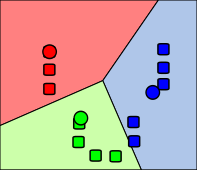
The algorithm works off of the ideas of centroids, which represent the "center" of the clusters of data (represented by circles in the illustration). The algorithm's inputs are the data and an initial guess at the k different centroids, usually chosen at randomly. Next the algorithm takes each data point and computes which cluster the point is closest to, and thus assigns that data point to that particular cluster. Now that every point is assigned to one of the initial guessed at clusters, the new centroids (center of all the points assigned to each cluster) are calculated. Now that there are new centroids, the cluster assignment may have change, so the algorithm goes back and recalculates the distances. This process is repeated until the clusters no longer change.
Since this algorithm may fail to find the "best" clustering assignment due to a poor initial guess, the algorithm is usually run with multiple different initial guesses. The next step would be to determine which clustering assignment was "best" using some heuristics or other mechanisms.
I have implemented the algorithm in Octave, a software package with capabilities similar to Matlab. The implementation works on any dimensionality data, allowing greater flexibility than just classifying dyads.% Our data points, in this case 2d points, but could be in any dimension % Each row represents a data point, each column represents a dimension X = [1 1; 2 1; 4 3; 5 4]; % Our initial guess at the centroids, in this case the first two data points centroids = [1 1; 2 1]; % Make a function call to my k-means clustering function [centroids, clusterAssignment] = kMeansCluster(X, centroids);The bulk of the work is done in the function kMeansCluster. The function works by first calculating which clusters each data point belongs to, and then updating the centroids accordingly. The function then repeats until the cluster assignment fails to change. The function takes advantage of the trivial function distance I wrote, which just calculates the distances between two points using Euclidean distance, but could be any "distance" mechanism appropriate for your data collection.
function [centroids, clusters] = kMeansCluster(X, initialCentroids)
%KMEANSCLUSTER assign clusters to the data from X based on
% euclidian distance

% initialize centroids to the initial guess
centroids = initialCentroids;
k = size(centroids, 1); % number of clusters
m = size(X, 1);         % number of data points
% assign clusters to something random so that the
% first cluster calculation is not coincidentally the same
% causing the the algorithm to end prematurely
clusters = rand(m, k);

while 1
   % calculate the new cluster assignment based on the centroids
   % For each row which represents each data point
   % Each columns will be 0 except the column representing
   % the cluster this point belongs to which will be 1
   newClusters = zeros(m, k);
   for i = 1:m
      % Calculate distance to each centroid
      distances = zeros(1, k);
      for j = 1:k
         distances(j) = distance(X(i, :), centroids(j, :));
      end

      % determine which centroid is closed to this data point
      [temp, index] = min(distances);

      % Set 0 for every cluster for this data point
      newClusters(i, :) = zeros(1, length(newClusters(i, :)));

      % Set 1 for the closest cluster
      newClusters(i, index) = 1;
   end

   % update centroids based on new cluster assignments
   for i = 1:k
      total = zeros(1, size(X, 2));
      count = 0;
      for j = 1:m
         if newClusters(j, i) == 1
            total += X(j, :);
            count++;
         end
      end

      if count == 0
         % prevent divide by zero
         centroids(i, :) = zeros(1, size(X, 2));
      else
         % calculate the average point
         centroids(i, :) = total / count;
      end
   end

   if newClusters == clusters
      % if this is the same as the last cluster, we are done
      break;
   else
      % We have a different cluster assignment, keep iterating
      clusters = newClusters;
   end
end
end
Running of this program will appropriately determine the clusters and output the centroids too:
% Initial data
%
% 5....x
% 4.....
% 3...x.
% 2.....
% 1xx...
% |12345
X =
    1    1
    2    1
    4    3
    5    3

initialGuess =
    1    1
    2    1

% [centroids, clusterAssignemnt] = kMeansCluster(X, centroids);
centroids =
    1.5000   1.0000
    4.5000   3.5000

clusterAssignment =
    1    0
    1    0
    0    1
    0    1
k-means clustering can be used for many things that may not be obvious based on the visual. For example, we could define a spam classifier algorithm. The 2 clusters would be spam and not spam, the data points would represent email characteristics (possibly with normalization, such as:
When we run the classifier on some mail sample, the algorithm will output 2 clusters. Some other method will have to be used to determine which cluster is spam and which cluster is not spam. This algorithm will probably not be as good as Bayesian spam filtering and is heavily dependent on what characteristics you pick, but it does demonstrate k-means clustering's capabilities.
I hope my example k-means clustering algorithm explanation was helpful. Please post any questions in the comments.
    /// <summary>
    /// Interface for a data structure that implements a Trie.
    /// </summary>
    /// <typeparam name="TKey">Type of the Key to store. Note each entry in the Trie has multiple Keys represented by an IEnumerable.</typeparam>
    /// <typeparam name="TValue">Type of the Value to store. This type must have a public parameterless constructor.</typeparam>
    public interface ITrie<TKey, TValue> : IDictionary<IEnumerable<TKey>, TValue>
    {
        /// <summary>
        /// Find all KeyValuePairs whose keys have the prefix specified by keys
        /// </summary>
        /// <param name="keys">Keys that all results must begin with</param>
        /// <returns>Collection of KeyValuePairs whose Keys property begins with the supplied keys prefix</returns>
        ICollection<KeyValuePair<IEnumerable<TKey>, TValue>> Suffixes(IEnumerable<TKey> keys);
    }
Notice that I abstracted out the concept of sets of keys from the interface. This cleans up many methods, while still making the user aware via method signatures that entries in the associative array are represented by sets of keys and not keys. Here is what the interface becomes for a Trie implementing ITrie:
    /// <summary>
    /// Implementation of the ITrie interface, representing a collection of keys of keys and values.
    /// </summary>
    /// <typeparam name="TKey">Type of the Key to store. Note each entry in the Trie has multiple Keys represented by an IEnumerable.</typeparam>
    /// <typeparam name="TValue">Type of the Value to store. This type must have a public parameterless constructor.</typeparam>
    public class Trie<TKey, TValue> : ITrie<TKey, TValue> where TValue : new()
    {
        /// <summary>
        /// Initializes a new instance of the Trie class.
        /// </summary>
        public Trie()
        {
            this.root = new Node<TKey, TValue>();
            this.keys = new List<IEnumerable<TKey>>();
            this.values = new List<TValue>();
        }

        #region ICollectionProperties
        /// <summary>
        /// Gets the number of elements contained in the ICollection.
        /// </summary>
        public int Count;

        /// <summary>
        /// Gets a value indicating whether the ICollection is read-only.
        /// </summary>
        public bool IsReadOnly;
        #endregion

        #region IDictionaryProperties
        /// <summary>
        /// Gets an ICollection containing the keys of the IDictionary.
        /// </summary>
        public ICollection<IEnumerable<TKey>> Keys;

        /// <summary>
        /// Gets an ICollection containing the values in the IDictionary.
        /// </summary>
        public ICollection<TValue> Values;
        #endregion

        #region IDictionaryIndexers
        /// <summary>
        /// Gets or sets the element with the specified key.
        /// </summary>
        /// <param name="keys">The key of the element to get or set.</param>
        /// <returns>The element with the specified key.</returns>
        public TValue this[IEnumerable<TKey> keys];
        #endregion

        #region ICollectionMethods
        /// <summary>
        /// Adds an item to the ICollection.
        /// </summary>
        /// <param name="item">The object to add to the ICollection.</param>
        public void Add(KeyValuePair<IEnumerable<TKey>, TValue> item);

        /// <summary>
        /// Removes all items from the ICollection.
        /// </summary>
        public void Clear();

        /// <summary>
        /// Determines whether the ICollection contains a specific value.
        /// </summary>
        /// <param name="item">The object to locate in the ICollection.</param>
        /// <returns>true if item is found in the ICollection; otherwise, false.</returns>
        public bool Contains(KeyValuePair<IEnumerable<TKey>, TValue> item);

        /// <summary>
        /// Copies the elements of the ICollection to an Array, starting at a particular Array index.
        /// </summary>
        /// <param name="array">The one-dimensional Array that is the destination of the elements copied from ICollection. The Array must have zero-based indexing.</param>
        /// <param name="arrayIndex">The zero-based index in array at which copying begins.</param>
        public void CopyTo(KeyValuePair<IEnumerable<TKey>, TValue>[] array, int arrayIndex);

        /// <summary>
        /// Removes the first occurrence of a specific object from the ICollection.
        /// </summary>
        /// <param name="item">The object to remove from the ICollection.</param>
        /// <returns>true if item was successfully removed from the ICollection; otherwise, false. This method also returns false if item is not found in the original ICollection.</returns>
        public bool Remove(KeyValuePair<IEnumerable<TKey>, TValue> item);
        #endregion

        #region IDictionaryMethods
        /// <summary>
        /// Adds an element with the provided key and value to the IDictionary.
        /// </summary>
        /// <param name="keys">The object to use as the key of the element to add.</param>
        /// <param name="value">The object to use as the value of the element to add.</param>
        public void Add(IEnumerable<TKey> keys, TValue value);

        /// <summary>
        /// Determines whether the IDictionary contains an element with the specified key.
        /// </summary>
        /// <param name="keys">The key to locate in the Dictionary.</param>
        /// <returns>true if the IDictionary contains an element with the key; otherwise, false.</returns>
        public bool ContainsKey(IEnumerable<TKey> keys);

        /// <summary>
        /// Removes the element with the specified key from the IDictionary.
        /// </summary>
        /// <param name="keys">The key of the element to remove.</param>
        /// <returns>true if the element is successfully removed; otherwise, false. This method also returns false if key was not found in the original IDictionary.</returns>
        public bool Remove(IEnumerable<TKey> keys);

        /// <summary>
        /// Gets the value associated with the specified key.
        /// </summary>
        /// <param name="keys">The key whose value to get.</param>
        /// <param name="value">When this method returns, the value associated with the specified key, if the key is found; otherwise, the default value for the type of the value parameter. This parameter is passed uninitialized.</param>
        /// <returns>true if the object that implements IDictionary contains an element with the specified key; otherwise, false.</returns>
        public bool TryGetValue(IEnumerable<TKey> keys, out TValue value);
        #endregion

        #region ITrieMethods
        /// <summary>
        /// Find all KeyValuePairs whose keys have the prefix specified by keys
        /// </summary>
        /// <param name="keys">Keys that all results must begin with</param>
        /// <returns>Collection of KeyValuePairs whose Keys property begins with the supplied keys prefix</returns>
        public ICollection<KeyValuePair<IEnumerable<TKey>, TValue>> Suffixes(IEnumerable<TKey> keys);
        #endregion

        #region IEnumerableMethods
        /// <summary>
        /// Returns an enumerator that iterates through the collection.
        /// </summary>
        /// <returns>A IEnumerator that can be used to iterate through the collection.</returns>
        public IEnumerator<KeyValuePair<IEnumerable<TKey>, TValue>> GetEnumerator();

        /// <summary>
        /// Returns an enumerator that iterates through a collection.
        /// </summary>
        /// <returns>An IEnumerator object that can be used to iterate through the collection.</returns>
        IEnumerator IEnumerable.GetEnumerator();
        #endregion
}
This makes a nice Trie that is useful not only for simple word game solvers, but also complex associate array uses. For an example use, we can use the word game. Say we are given the prefix "do" and told to determine whether for a given list of words, if there are any words that begin with this prefix. We could use linq, but this is inefficient as we have to do a string comparison on every word in the word list:
words.Where(word => word.StartsWith("do")).Any();
A Trie on the otherhand can simply navigate to a certain node of the prefix tree, and enumerate all decendents. If there are no decendents, then we know there are not any words that start with the given set of keys:
words.Suffixes("do").Count == 0;
I've zipped the library and made availble under the lenient public domain license where available. Please comment on my implementation in the comments! I definitely know we can improve the enumerator to have a smaller memory footprint.
public IEnumerable<int> count(int start, int end)
{
   int counter = end;
   while (counter <= end)
   {
      yield return counter;
      counter++;
   }
}
I used a while loop here intentionally so the control flow is obvious. Up until the yield statement, everything is normal. So what is happening at "yield return counter"? The function execution stops and returns the variable counter for each "call" happening indirectly through the iterator. So what happens the next time the iterator issues a call to this function? Well, the execution picks up at counter++! But what is the value of counter? The special yield return statement is saving the entire state of the generator(local variables, instruction pointer, and any other state information), allowing the generator to be resumed exactly where it left off. I'll get to that other information later. To wrap up the basic, right before yielding a value, save the state of the generator. Upon entering the generator again, restore the saved state and jump to where we left off.public IEnumerable<int> count(int start, int end)
{
yield return start;
if (start != end)
{
// foreach (int result in count(start + 1, end))
// {
// yield return result;
// }
IEnumerator<int> enumerator = count(start + 1, end).GetEnumerator();
while (false != enumerator.MoveNext())
{
yield return enumerator.Current;
}
}
}
This generator does the same thing, just in a recursive fashion. The first yield is exactly as the one previously examined. Things get slightly more difficult to keep track when the recursion begins, but the same exact process is followed. The enumerator is saved as part of the state of the count generator. When returning, the iterator is restored and so the generator continues as expected.public IEnumerable<int> count(int start, int end)
{
yield return start;
if (start != end)
{
// Will not compile
yield return count(start + 1, end);
}
}
then the state would have to include the call stack of the recursion produced by the generator. By explicitly restricting yield to return the enumerated base type (int), we are prevented from this operation because count returns an enumerable type. This makes implementing generators manually easier. We don't have to worry about recursion at all.class Generator<T, State, RetType>
: IEnumerable<RetType> where T : GeneratorIterator<State, RetType>, new()
{
public Generator(State initialState)
{
this.initialState = initialState;
}
private State initialState;
#region IEnumerable
public IEnumerator<RetType> GetEnumerator()
{
GeneratorIterator<State, RetType> yieldedFunction = new T();
yieldedFunction.Initialize(initialState);
return yieldedFunction;
}
IEnumerator IEnumerable.GetEnumerator()
{
return this.GetEnumerator();
}
#endregion
}
public abstract class GeneratorIterator<State, RetType> : IEnumerator<RetType>
{
public void Initialize(State initialState)
{
this.initialState = initialState;
this.currentState = initialState;
}
public RetType YieldReturn(State state, RetType result)
{
// Save state before returning
this.currentState = state;
return result;
}
private State initialState;
private State currentState;
private RetType nextResult;
public abstract RetType function(State currentState);
#region IEnumerator
public RetType Current
{
get
{
return this.nextResult;
}
}
object IEnumerator.Current
{
get
{
return this.Current;
}
}
public void Reset()
{
// Set the state back and invalid nextResult
this.Initialize(this.initialState);
this.nextResult = default(RetType);
}
public bool MoveNext()
{
this.nextResult = this.function(this.currentState);
return this.currentState != null;
}
public void Dispose() { }
#endregion
}
Let's examine what this class is doing. It is taking a class that is expected to override a member called function. This will be the function that is expected to be using the YieldReturn method provided by this class. Most of the code is setting up the enumerator. The enumerator takes care of calling the function when appropriate. The real magic that enables this class to be a generator is the currentState variable. This is where the function's state is saved. Whenever the function is needed, the function is passed the current state that was saved by YieldReturn. The function is responsible for using the state to produce the expected results.class Count : GeneratorIterator<CountState, int>
{
public override int function(CountState currentState)
{
if (currentState.stateIndex == 0)
{
currentState.counter = currentState.start;
currentState.stateIndex = 1;
// Proceed to state 1
}
if (currentState.stateIndex == 1)
{
while (currentState.counter <= currentState.end)
{
// Set the next state
currentState.stateIndex = 2;
// yield return
return YieldReturn(currentState, currentState.counter);
}
// Signal no more to yield, normally accomplished by reaching end of the function
return YieldReturn(null, default(int));
}
if (currentState.stateIndex == 2)
{
currentState.counter = currentState.counter + 1;
currentState.stateIndex = 1;
// Use recursion to jump to state already passed
return function(currentState);
}
// Can only get here if an invalid stateIndex was given
throw new Exception("Unreachable");
}
}
class CountState
{
public int stateIndex;
public int start;
public int end;
public int counter;
}
The stateIndex variable of the CountState class is used to determine where in the code path we left off. The function has no locals to avoid having variables no properly restored when upon reentry. To use this generator, we simply instantiate the wrapper and then the class behaves as all enumerator types do.CountState initialState = new CountState
{
start = 0,
end = 5,
stateIndex = 0
};
Generator<Count, CountState, int> generator = new Generator<Count, CountState, int>(initialState);
foreach (int result in generator)
{
Console.WriteLine(result);
}
To illustrate that recursion is supported, I am translated the recursive count above to an appropriate finite state machine. You can try for yourself, but you can observe that there is no need to save a call stack to support recursion in your generators.class RecursiveCount : GeneratorIterator<RecursiveCountState, int>
{
public override int function(RecursiveCountState currentState)
{
if (currentState.stateIndex == 0)
{
currentState.stateIndex = 1;
return YieldReturn(currentState, currentState.start);
}
if (currentState.stateIndex == 1)
{
if (currentState.start == currentState.end)
{
// We are done, signal no more results in this generator
currentState.stateIndex = 3;
}
else
{
/// repeat
currentState.recursiveCall = new Generator<RecursiveCount, RecursiveCountState, int>(
new RecursiveCountState
{
start = currentState.start + 1,
end = currentState.end,
stateIndex = 0
}).GetEnumerator();
// Go to state 2
currentState.stateIndex = 2;
}
}
if (currentState.stateIndex == 2)
{
while (false != currentState.recursiveCall.MoveNext())
{
return YieldReturn(currentState, currentState.recursiveCall.Current);
}
// We are done, signal no more results in this generator
currentState.stateIndex = 3;
}
if (currentState.stateIndex == 3)
{
return YieldReturn(null, default(int));
}
throw new Exception("Unreachable");
}
}
class RecursiveCountState
{
public int stateIndex;
public int start;
public int end;
public IEnumerator<int> recursiveCall;
}
I hope that this has been informative of the inner workings of generators and the yield statement. Please comment below with any questions.
   private static IEnumerable<string> Permutations(string input)
   {
      List<string> result = new List<string>();
      if (string.IsNullOrEmpty(input))
      {
         yield return string.Empty;
      }
      else
      {
         for (int i = 0; i < input.Count(); i++)
         {
            foreach (string permutation in Permutations(input.Substring(0, i) + input.Substring(i + 1)))
            {
               yield return input[i] + permutation;
            }
         }
      }
   }
If you iterate over this function, you will notice that the entire list is never generated entirely in memory. The syntax would be something along the lines of:
   foreach (string permutation in Permutations("vegetable"))
      {
         System.Console.WriteLine(permutation);
      }
Thanks to my friend for helping me understand this topic and bring attention to features of a language I use every day.


